Where Your Download Actually Takes You (And What It Costs)
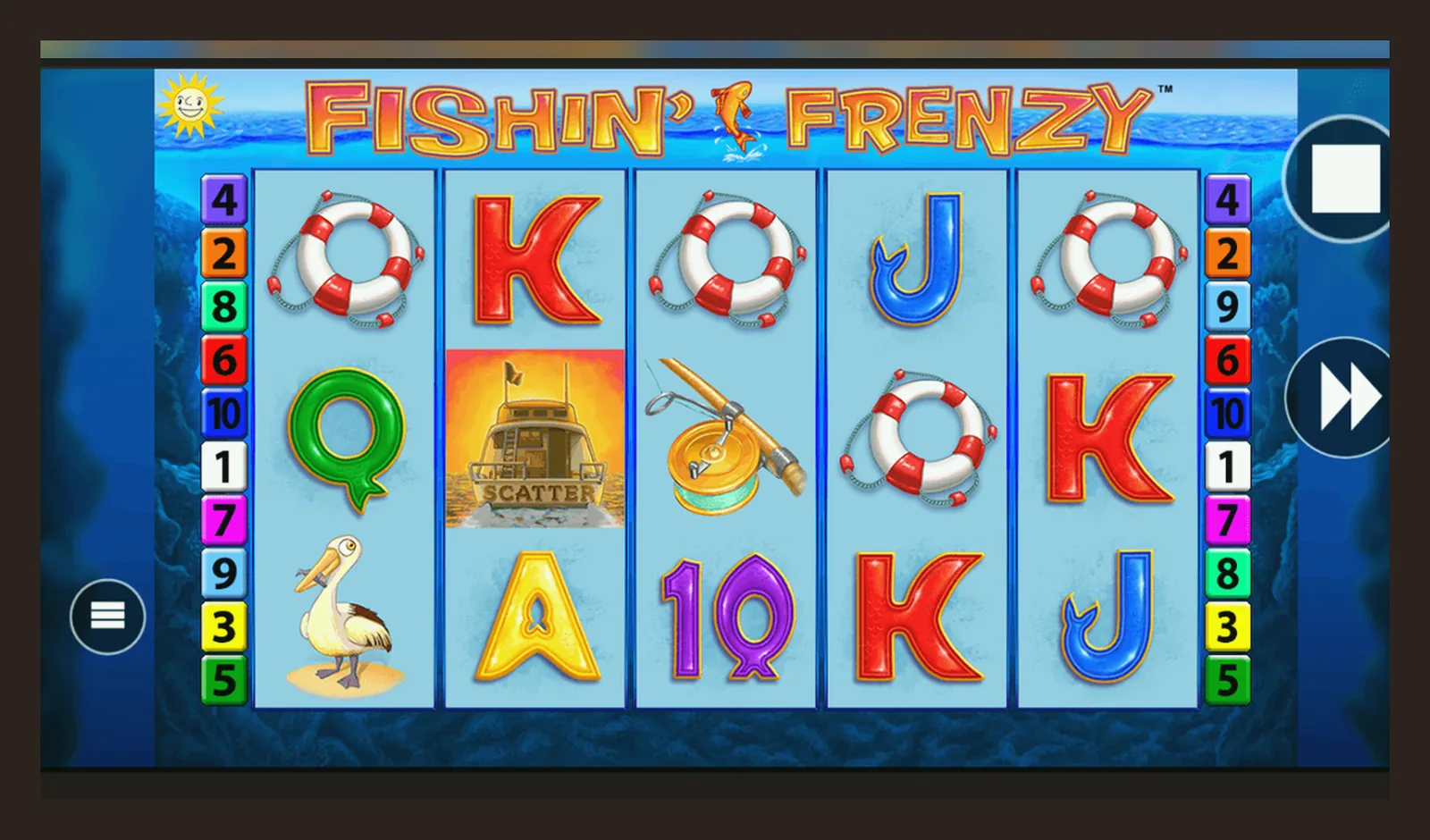
You're not downloading Fishin' Frenzy from the Play Store or App Store — you're downloading a casino operator's app that hosts it, or you're playing in a mobile browser. Blueprint Gaming doesn't publish a standalone game app, and any APK claiming otherwise is either a demo wrapper or a clone you shouldn't trust with your details.
The real cost of «getting the app» is the time spent on age verification, the KYC documents before your first withdrawal, and the £150-a-month affordability threshold that triggers credit-reference checks under UKGC rules. If you're after instant access, the browser route is faster. If you want an icon on your home screen, the operator's app or a web-app bookmark does the job without the APK risk.
The Store Card You Won't Find (Because It's Not There)
Fishin' Frenzy isn't a standalone product in Google Play or the App Store. It's a slot inside casino platforms, so there's no single listing. But if you're comparing operator apps that carry the game, here's what a typical entry looks like — plausible numbers for a mid-tier UK casino app, not Blueprint's non-existent solo release.
The rating reflects the operator's service — withdrawal speed, KYC friction, customer support — not the game's mechanics. A 3.8 is common: players vent about affordability checks and document requests, not the fish animations. Downloads in the half-million range signal a mid-sized brand; the big aggregators with dozens of Blueprint slots hit millions.
What You Actually See on Screen (Five Moments That Matter)
Operator apps and browser play show similar screens, but the order changes. Here are five you'll encounter, with the moments that cost you time or money.
- Login / registration screen: email, password, date of birth. The UKGC demands age verification before you deposit, so expect a prompt to upload a passport or driving licence within minutes of signing up. This is where the 24–48-hour wait starts if documents need manual review.
- Lobby with Blueprint's catalogue: Fishin' Frenzy sits alongside Fishin' Frenzy Megaways, The Goonies, Ted, and other Blueprint titles. The operator's search filters by provider, but no app groups games by volatility or RTP — you're hunting by thumbnail and name.
- Game-loading screen: 3–5 seconds in a browser, near-instant in a native app if assets are cached. The first launch downloads game files; subsequent opens are faster. This is where you see the Blueprint logo and the «18+ / BeGambleAware» footer, required under UK advertising rules.
- Stake selector and balance display: your real-money balance in GBP, the stake slider (capped at £5.00 per spin, or £2.00 if you're 18–24), and the autoplay menu. The app won't let you exceed the legal cap — it's hard-coded, not a courtesy feature.
- Withdrawal request and KYC prompt: after a win, you tap withdraw, enter the amount, and hit a document upload screen if you haven't cleared KYC yet. Faster Payments to your bank take same-day to two working days once approved; e-wallets are quicker, but not every UKGC site offers them. Credit cards have been banned for gambling since 2020, so your deposit and withdrawal methods must match and be in your own name.
The game screen itself — the blue water, the fisherman, the Free Spins scatter — looks identical across devices and operators. What differs is the frame around it: the cashier, the limits, the verification steps. That's where your time and patience get spent.
Four Paths to Install (And the Real Cost of Each)
No method is instant-and-anonymous. The UKGC's rules mean you're verified before you play for real money, no matter which route you take. Here's the friction and risk profile of each.
| Method | Steps | Time to First Spin | Risk | |
|---|---|---|---|---|
| Mobile browser | 1. Open site in Safari / Chrome 2. Log in or register 3. Upload ID for age check 4. Deposit via debit card / PayPal 5. Tap Fishin' Frenzy in lobby | 5 min + 24–48 h KYC wait | Zero — no install, UKGC site in the register | → |
| Add to Home Screen | 1. Play in browser first 2. Tap Share (iOS) or menu (Android) 3. Select «Add to Home Screen» 4. Icon appears, opens browser view | Instant after first browser visit | Zero — it's a bookmark, not an app | → |
| Operator's native app | 1. Search casino name in Play Store / App Store 2. Install (50–70 MB) 3. Register and verify in-app 4. Deposit and find game | 10 min + 24–48 h KYC wait | Low if operator is in UKGC register; check licence number in footer | → |
| APK from third party | 1. Enable «Unknown sources» in Android settings 2. Download .apk file from web 3. Install manually 4. Hope it's not malware | Minutes, but unplayable for real money | High — no UKGC licence, no player protection, potential data theft | → |
The browser path is fastest because you skip the app-install step and start KYC immediately. The operator's app caches assets for faster loading on repeat plays, but the upfront download eats data and time. Add-to-Home-Screen is the middle ground: it looks like an app, loads like a browser, and costs nothing but a tap.
What Your Phone Needs (And Why Older Devices Stall)
Fishin' Frenzy is HTML5, so it runs in any modern mobile browser without plugins. But «modern» has a threshold, and crossing below it means laggy spins, frozen animations, or a game that won't load at all.
- Operating system: iOS 13 or later, Android 8 or later. Older versions may lack the WebGL support that renders the underwater graphics.
- RAM: 2 GB minimum, 3 GB comfortable. The game itself is light, but the operator's site wrapper — live chat, lobby feeds, balance updates — adds overhead. If you're multitasking with other apps, 2 GB struggles.
- Storage: 100 MB free for browser cache, 60–80 MB for an operator app. The game assets are downloaded once and reused, but the cache grows with session data and promotional graphics.
- Connection: 4G or Wi-Fi. The game loads in under 5 seconds on a stable connection; on 3G or patchy signal, expect 15–20 seconds and mid-spin freezes. Each spin transmits bet and result data to the server, so a dropped connection voids the round — the stake is returned, but you lose momentum.
- Screen: 5 inches minimum for comfortable play. The UI scales to fit, but on a 4-inch screen the stake buttons and paytable are cramped. Landscape mode helps, but the game is designed portrait-first.
An iPhone 8 or Samsung Galaxy S9 from 2017–2018 handles the game fine in the browser. Older than that — iPhone 6, Galaxy S6 — and you'll hit performance drops. Native operator apps demand slightly more: they bundle extra features (notifications, account history, loyalty trackers) that a 2016-era phone won't run smoothly.
What the App Actually Does (Beyond Spinning Reels)
A casino operator's app isn't just a wrapper for Fishin' Frenzy. It's a platform with deposit tools, limits management, and UKGC-mandated safer-gambling controls. Here's what you get alongside the game, and why some of it costs you money or time.
- Deposit and withdrawal interface: debit card, PayPal, Apple Pay, Open Banking via Trustly, paysafecard. Credit cards are banned for gambling since 2020, so those options don't appear. Deposits are instant; withdrawals to a bank via Faster Payments take same-day to two working days after KYC clears. E-wallet payouts (if offered) land in a few hours to 24 hours.
- Reality checks and session timers: pop-ups every 30–60 minutes showing time played and net loss. You can dismiss them, but they're mandatory under UKGC rules. If you've been playing for over an hour at £2.00+ stakes, the operator logs it for affordability monitoring.
- Deposit-limit controls: daily, weekly, and monthly caps you set yourself. The UKGC requires operators to offer these, and they kick in immediately on tightening (24–48 hours on loosening). If you hit £150 net deposits in a month, the operator starts soft affordability checks — account-activity review. At higher thresholds, they pull credit-reference data and may restrict your account until you provide payslips or bank statements.
- GAMSTOP link: one tap to the national self-exclusion register. Register once, and every UKGC-licensed site blocks you for 6 months to 5 years, no exceptions. It's a nuclear option, not a pause button.
- Transaction history and bonus tracker: every spin, deposit, and withdrawal logged with timestamps. Bonus wagering progress is visible here — if you took a welcome offer, you'll see how much of the 35x or 40x requirement is left. Until the wager clears, your balance is locked for withdrawal.
- Push notifications: deposit reminders, bonus expiry alerts, new-game announcements. Useful for tracking your spend, intrusive if you're trying to stay away. You can disable them in settings, but the app nags you to re-enable.
The app knows more about your play than you might notice. Session length, stake patterns, win-to-loss ratio, deposit frequency — all tracked for UKGC compliance and affordability checks. That data doesn't leave the operator's system unless you trigger a review, but it's there. If you're uncomfortable with that level of monitoring, the browser route has the same logging, just less visible.
How to Spot a Fake (And Which Permissions Scream Scam)
Clone apps and dodgy APKs exist because Fishin' Frenzy is popular and people search for shortcuts. Here's how to separate the legitimate operator apps from the fakes that want your card details or personal data.
- Developer name: a real casino operator lists their company name as the developer — «XYZ Casino Ltd» or similar. If the developer is «Fishin Frenzy Games» or «Blueprint Slots», it's fake. Blueprint Gaming doesn't publish apps; they licence games to operators.
- UKGC licence number in the app: open the app, scroll to the footer or About section, and check for a licence number (format: 000-000000-X-000000-XXX). Cross-check it in the UKGC's public register at gamblingcommission.gov.uk. If the number is missing or doesn't match, the app is unlicensed and illegal to use for UK players.
- Permissions requested: a legitimate casino app asks for storage (to cache game assets), network (to connect to servers), and optionally camera (for document upload during KYC). Red flags: SMS access, contacts, call logs, microphone without explanation, or «install unknown apps» permission. Those are data-harvesting or phishing vectors.
- APK sources: if you're downloading an APK from a forum, Telegram group, or file-sharing site, assume it's compromised. Legitimate operators distribute apps through the Play Store or App Store only, or via a direct download link on their own licensed website (with the UKGC number visible). Any other source is a risk.
- Too-good-to-be-true offers: «No deposit required», «Unlimited free spins», «Hack the RNG» — if the app or APK promises that, it's either a demo wrapper with no real-money mode, or a scam collecting your details to sell or exploit. UKGC-licensed sites can't make those claims; advertising rules forbid it.
- Review patterns: check the Play Store or App Store reviews. If the app has 4.9 stars and every review is five words of praise posted the same day, they're fake. Real casino apps hover around 3.5–4.2 stars, with complaints about KYC delays, withdrawal waits, and affordability checks — that's normal friction, not a red flag.
The safest route: pick a UKGC-licensed operator from the register, download their app from the official store, or play in the mobile browser. It's slower, it has more checks, and it won't let you skip the rules. That's the cost of playing legally, and it's the only way your money is covered under UK consumer protection.
FAQ
Can I download Fishin' Frenzy directly from Blueprint Gaming?
No. Blueprint Gaming is a B2B provider — they licence games to casino operators, not players. You play Fishin' Frenzy through a UKGC-licensed operator's site or app, not a standalone Blueprint release. Any app claiming to be an official Blueprint download is a fake.
Do I need to download an app to play on my phone?
No. The mobile browser works fine — open the operator's site in Safari or Chrome, log in, and tap the game. Add-to-Home-Screen gives you an icon without the storage cost of a full app. Native apps load faster on repeat plays but require 50–70 MB of space and a download wait.
Why does the app ask for my passport before I can deposit?
UKGC rules. Every operator must verify your age and identity before you deposit real money. You'll upload a passport, driving licence, or national ID card, and wait 24–48 hours for manual review. This applies to browser and app play — there's no shortcut.
Is it safe to install an APK from a third-party site?
No. APKs from forums, file-sharing sites, or Telegram groups aren't vetted by Google or Apple, and many contain malware or phishing code. Legitimate UKGC-licensed operators distribute apps through the Play Store, App Store, or a direct link on their own licensed website. Any other source is a risk to your data and money.
Why is my stake capped at £2.00 per spin when I'm 18?
UKGC rule introduced for players aged 18–24: online slots are capped at £2.00 per spin to reduce harm. Once you turn 25, the cap lifts to £5.00. The operator's system enforces this automatically based on your date of birth — you can't override it.
How long does the first withdrawal take, and why is it slower than deposits?
First withdrawal: 1–3 working days after KYC clears, longer if you're asked for additional documents (payslips, bank statements) during affordability checks. Deposits are instant because they're pre-verified by your bank. Withdrawals trigger a manual review the first time — the operator checks for bonus abuse, multiple accounts, and payment-method mismatch. Faster Payments to your bank is the standard UK method; e-wallet payouts are quicker (few hours to 24 hours) but not offered by every site.